Added: 19 September, 2007
Group: Maya
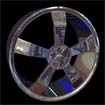
Create a realistic chrome car rims
Author: TechTut.com
page: 3
Tutorial on how to make car rims part 3
Make extrude:


Duplicate it 4 times with 72 degree rotation in Z axis:

Select all object and make combine:

Select all vertices and make merge:

Convert it to SubD, or just press alt+~

Convert SubD to Polygons:

Create cylinder with 60 divisions:

Position it like on picture, move pivont point to center of rim:

Duplicate it wit 72 degree for 4 times:

GO to: Page 1 : Tutorial on how to make car rims part 1
GO to: Page 2 : Tutorial on how to make car rims part 2
GO to: Page 3 : Tutorial on how to make car rims part 3
GO to: Page 4 : Tutorial on how to make car rims part 4
TechTut.com This tutorial is copyrighted. Partial duplication or full duplication is prohibited and illegal. Translation or usage of any kind without author�s permission is illegal.






 Join our RSS feed
Use our RSS feed to get the latest published tutorials directly to your news reader.