Added: 5 November, 2007
Group: 3D studio max
Create apple bowl in 3D max
Author: TechTut.com
GO to: Page 1 : Apple bowl part 1
GO to: Page 2 : Apple bowl part 2
GO to: Page 3 : Apple bowl part 3
GO to: Page 4 : Apple bowl part 4
GO to: Page 2 : Apple bowl part 2
GO to: Page 3 : Apple bowl part 3
GO to: Page 4 : Apple bowl part 4
page: 4
Apple bowl part 4
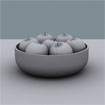
Since the apple bowl is done let’s finished the scene with “Light tracer”. Create the “sunlight” in perspective view, and apply the Light tracer from the “Advanced Lightning” tab.


Change the environment color by pressing “8” on keyboard.

Render your scene.


Thats all.
GO to: Page 1 : Apple bowl part 1
GO to: Page 2 : Apple bowl part 2
GO to: Page 3 : Apple bowl part 3
GO to: Page 4 : Apple bowl part 4
TechTut.com This tutorial is copyrighted. Partial duplication or full duplication is prohibited and illegal. Translation or usage of any kind without author�s permission is illegal.


 Join our RSS feed
Use our RSS feed to get the latest published tutorials directly to your news reader.